%20200%20px%20X%2040%20px.png?width=200&height=40&name=Protiv%20Global%20Logo%20(White)%20200%20px%20X%2040%20px.png)
📊 Health Overview & Dashboards
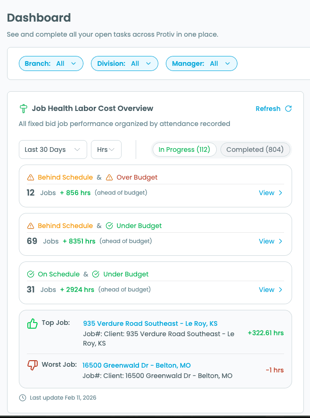
We’ve introduced a Job Health Labor Cost Overview to give you a clearer picture of labor performance across fixed-bid jobs.
What’s new
The dashboard now organizes non-recurring jobs into clear performance categories based on schedule progress and labor budget status:
-
Behind Schedule & Over Budget
-
Behind Schedule & Under Budget
-
On Schedule & Under Budget
-
Completed Over Budget
-
Completed Under Budget
Each category shows:
-
The number of jobs in that status
-
The total labor variance (how far over or under budget those jobs are)
This makes it easier to quickly assess overall labor performance without running separate reports.
Top & Worst Performing Jobs
The overview also highlights:
-
Your Top Performing Job
-
Your Worst Performing Job
This helps you immediately identify where performance is strongest, and where attention may be needed.
Drill-Down View
Clicking “View” within any category opens a detailed list of jobs in that segment. Inside the drill-down, you can see:
-
Budgeted dollars vs. actual dollars
-
Budgeted hours vs. actual hours
-
Labor progress (budget spent vs. total labor budget)
This allows you to move from high-level visibility to job-level detail in one click.
💰 ProPays
We’ve made improvements to improve clarity and organization within ProPay.
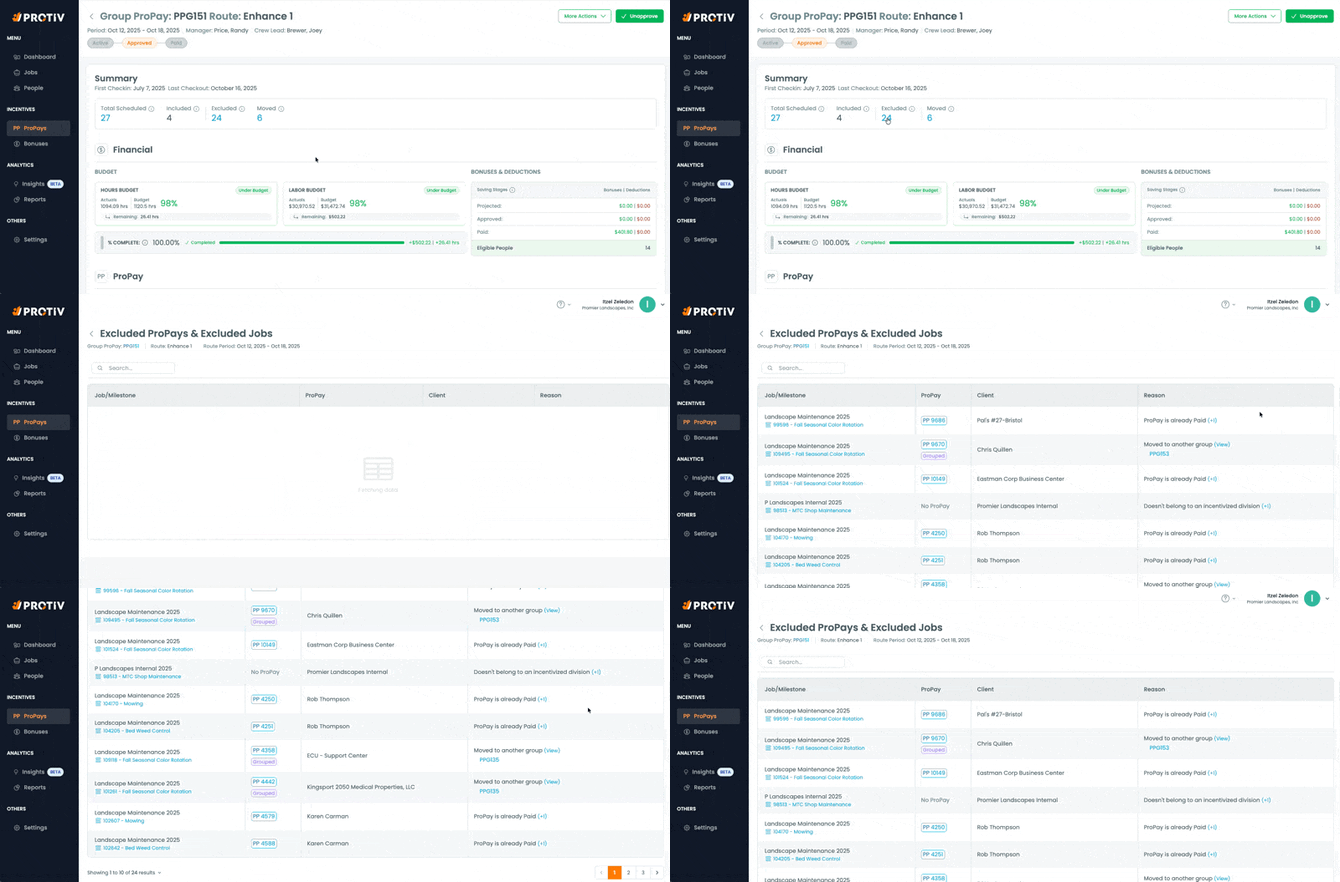
Clearer Visibility into Excluded ProPays & Jobs
We updated the language and visibility around exclusions so it’s easier to understand why a job or item is not included in a ProPay.
For example, exclusions may occur when:
-
A job does not belong to an incentivized division
-
A job has been moved to another group
-
It does not meet the criteria tied to that ProPay
The reason for exclusion is now clearer and easier to interpret.
This reduces confusion and helps prevent unnecessary back-and-forth when reviewing pay calculations.
Group and Filter ProPays by Job
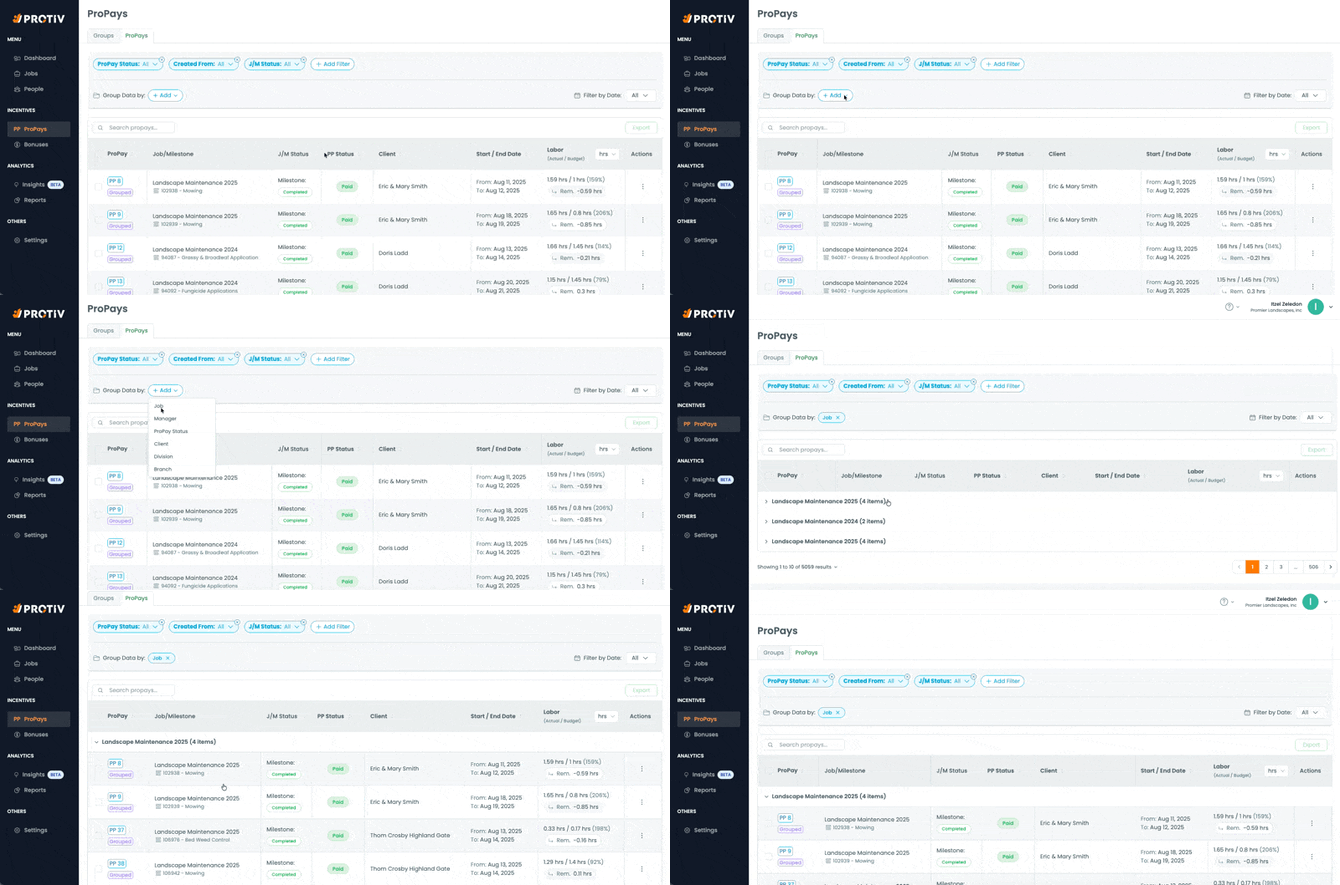
You can now group and filter ProPays by job.
This makes it significantly easier to:
-
Locate a specific ProPay
-
Review ProPays tied to a particular job
-
Organize records without manually searching
💳 Billing & Payments
We’ve improved billing visibility so you can easily track account activity and charges.
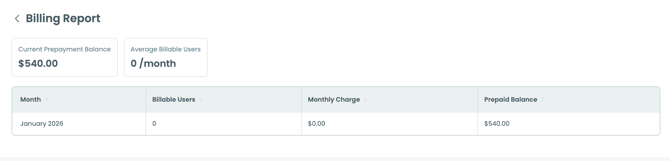
What You Can Now See in One Place
-
Current prepaid balance
-
Number of billable users
-
Monthly charges
-
Detailed billing reports by month
Billing reports now present monthly charge summaries alongside prepaid balances, making it easier to understand how charges are applied over time.
We also resolved prior issues affecting billing report visibility and improved overall reporting clarity.
🧱 Prophases (beta)
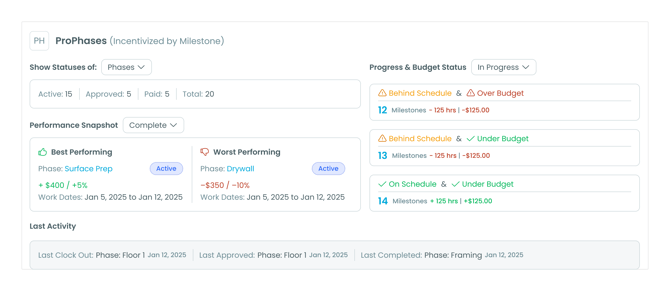
ProPhases break a ProPay into milestone-based segments.
Instead of tracking one incentive across the entire job, ProPhases let you track performance and bonuses by milestone.
How They Work
-
Each ProPhase is tied to a specific job milestone
-
Each phase tracks its own progress and bonus
-
Phases move through statuses: Active → Approved → Paid
-
Crews can see their progress in mobile
How They’re Created
ProPhases can be:
-
Automatically created based on your Incentive Settings (division, service, minimum hours, keyword rules)
-
Manually added if needed
Why It Matters
- ProPhases give you better control and visibility.
You can approve and pay incentives in stages instead of waiting for the entire job to finish.
🎯 What’s Next?
We’ll continue improving:
-
Dashboard visibility and labor performance insights
-
ProPay accuracy and reporting clarity
-
Rewards visibility
-
Integration reliability and sync stability
Our focus remains on speed, clarity, and helping you trust the numbers you rely on every day.
Still need help? Email or call us!
Email us at help@protiv.com: This is the fastest way to get a response. You can expect a reply in 1-2 hours during business hours.
Call us at +1 848-220-1416: You can also call us during business hours, weekdays from 9 am to 6 pm EST.